How to Download Vehicle RC Online in India: Step-by-Step Guide
Learn how to download your vehicle RC online in India, check registration details, access a digital RC and understand where your vehicle registration certificate can be used.
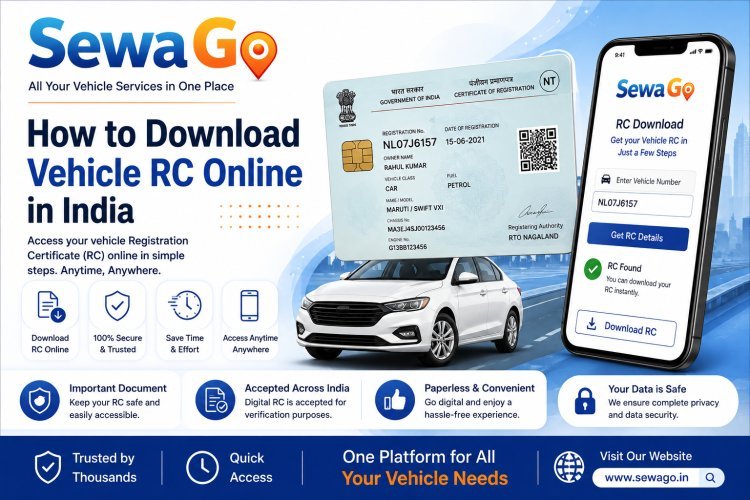
How to Download Vehicle RC Online in India: Step-by-Step Guide
The Registration Certificate, commonly called an RC, is one of the most important documents associated with a registered vehicle in India.
The RC contains important information about the vehicle and its registered owner. Keeping a copy of your RC easily accessible can be useful when managing your vehicle, travelling or completing different vehicle-related services.
Today, vehicle owners can access digital versions of important vehicle documents through supported online platforms and official digital document services.
In this guide, we explain what a vehicle RC is, how to access your RC online, what information it contains and what you should do if you cannot find your RC details.
What Is a Vehicle RC?
RC stands for Registration Certificate.
It is the document associated with the registration of a vehicle with the relevant Regional Transport Office (RTO).
The RC contains important information related to the registered vehicle.
Depending on the vehicle and record, details can include:
- Vehicle registration number
- Vehicle owner's name
- Vehicle make and model
- Fuel type
- Vehicle class
- Chassis number
- Engine number
- Registration date
- Registration authority
- Other vehicle-related information
Why Is the RC Important?
The RC serves as important evidence of vehicle registration.
Vehicle owners may need their RC details for various situations, including:
- Vehicle-related services
- Insurance-related requirements
- Buying or selling a vehicle
- Address or ownership-related processes
- Verification of vehicle information
- Other transport-related services
Keeping your RC information safely available can make these processes easier.
Can I Download My Vehicle RC Online?
In many cases, vehicle owners can access their vehicle registration information digitally through supported online platforms.
The exact method depends on the service being used and the availability of the vehicle record.
Digital vehicle documents may also be available through supported government or digital document platforms.
Always use trusted and authorised services when accessing vehicle documents.
How to Access Your Vehicle RC Online
The general process is straightforward.
Step 1: Keep Your Vehicle Registration Number Ready
First, keep your vehicle registration number available.
For example:
NL07J6157
Make sure the registration number is entered correctly.
Step 2: Use a Trusted Vehicle Information Service
Use an authorised or trusted platform that provides access to vehicle registration information.
Avoid entering your vehicle details into unknown websites or services.
Step 3: Enter the Required Details
Depending on the platform, you may be asked to provide your vehicle registration number or other information.
Enter the details carefully.
Step 4: Verify the Vehicle Information
Check that the information displayed belongs to your vehicle.
Verify important details such as:
- Registration number
- Vehicle type
- Owner information where displayed
- Registration date
- Vehicle details
If something appears incorrect, contact the relevant transport authority or service provider.
Step 5: Access or Save Your Digital Document
If the platform provides a digital RC or downloadable document, follow the instructions provided to access or save it.
Keep the digital copy securely stored on your phone or another trusted location.
Can I Download RC Using a Vehicle Number?
The vehicle registration number can be used to identify a vehicle record on supported platforms.
However, the exact information and document-access process depends on the platform and applicable verification requirements.
Do not assume that simply entering a registration number will always provide a downloadable RC.
What Information Is Available on an RC?
An RC can contain several important vehicle details.
These may include:
Registration Number: The unique registration number assigned to the vehicle.
Owner Details: Information associated with the registered owner.
Vehicle Class: The category or class of the vehicle.
Fuel Type: The fuel type recorded for the vehicle.
Registration Date: The date on which the vehicle was registered.
Chassis Number: The vehicle's chassis identification information.
Engine Number: The engine identification information recorded in the vehicle record.
The exact information displayed can vary depending on the record and platform.
What Is a Digital RC?
A digital RC is an electronic representation or digital record of the vehicle registration information.
Digital documents can make it easier to access important vehicle information without carrying physical paperwork everywhere.
However, users should rely on supported official or authorised digital document platforms and follow the applicable rules for accepting digital documents.
Physical RC vs Digital RC
A physical RC is the traditional document associated with vehicle registration.
A digital RC or digital vehicle document allows the information to be accessed electronically through supported platforms.
The convenience of digital access means vehicle owners can keep important vehicle information available on their mobile device.
What If I Cannot Find My RC Online?
If your vehicle information is not appearing online, there could be several reasons.
For example:
- The record may not be available on the particular platform.
- The information entered may be incorrect.
- The vehicle record may require an update.
- There may be a temporary technical issue.
- The transport database may require verification.
Check your vehicle details carefully and use the appropriate official channel if the problem continues.
What If the Information on My RC Is Incorrect?
If you notice an error in your vehicle registration information, do not simply ignore it.
Check the original vehicle documents and contact the appropriate transport authority or authorised service to understand the correction process.
Keep supporting documents available if they are required for verification.
Can I Use a Digital RC for Vehicle Services?
Digital access to vehicle registration information can make it easier to provide vehicle details when using supported vehicle services.
However, requirements can vary depending on the particular service.
If a service specifically requests a particular document or format, follow the requirements of that service.
Keep Your Vehicle Documents Organised
Your RC is only one of several important vehicle documents.
Depending on your vehicle and requirements, you may also need to keep track of:
- Insurance
- PUC certificate
- Tax information
- Permit
- Fitness certificate
- Driving licence
- Other vehicle-related documents
Keeping these documents organised can save time when you need them.
Access Vehicle Services With SewaGo
Managing different vehicle-related services can be time-consuming when you have to search for each service separately.
SewaGo brings multiple vehicle-related services together in one place, helping vehicle owners access services more conveniently.
Depending on the service you need, SewaGo provides options related to vehicle documents and other vehicle requirements.
You can use SewaGo to explore available vehicle services and get started.
For official registration records and transport-related information, always verify details through the appropriate government or authorised sources.
Frequently Asked Questions
What does RC stand for?
RC stands for Registration Certificate. It is the document associated with the registration of a vehicle.
Can I download my vehicle RC online?
Vehicle registration information and digital documents may be accessible through supported online and digital document platforms, depending on the vehicle record and applicable requirements.
Can I download RC using my vehicle number?
Your vehicle registration number can be used to identify the vehicle record on supported platforms, but additional verification may be required.
What details are available on an RC?
An RC can contain details such as the registration number, owner information, vehicle class, fuel type, registration date, chassis number and engine number.
What should I do if my RC details are incorrect?
Check your original documents and contact the appropriate transport authority or authorised service to understand how the record can be corrected.
Is a digital RC useful?
Yes. Digital access makes it more convenient to keep vehicle registration information available when needed, subject to applicable rules and acceptance requirements.
What other vehicle documents should I keep?
Important vehicle documents can include the RC, insurance, PUC and other documents applicable to your vehicle.
Final Thoughts
Your Registration Certificate is an important vehicle document, and having easy access to your vehicle registration information can save time.
Digital access has made it more convenient for vehicle owners to keep important vehicle documents available.
Before downloading or accessing your RC online, make sure you are using a trusted or authorised service and entering the correct vehicle information.
If your vehicle record contains an error or cannot be found, contact the appropriate transport authority or authorised service for assistance.
For other vehicle-related services, SewaGo provides a convenient way to explore and manage different vehicle service requirements.
What's Your Reaction?